Achieved 20% efficiency gain and reduced cognitive load for reliability engineers by designing an Agentic AI Work Order Assistant.

Context

My Role
UX Designer, AI Feature Lead
B2B Enterprise AI/LLM, Industrial ERP
Team
Dishmi Weerasekara (Product Owner)
Mathias Dahl (AI Expert & Solution Architect)
Jitharie Haputhanthrie (Developer)
Timeline & Status
October 2024 - February 2025
Tools
Figma, Fig Jam, Jira, Microsoft Teams
Overview
As a Product Designer specializing in B2B Enterprise AI , I led the design for Agentic AI assistants and a Work Order Generator. The solution automated complex reporting and work order management, achieving a documented 20% reduction in manual data entry and cognitive load for Reliability Engineers.

The Costly Time Sink: Reliability Engineers Drowning in Unstructured Reports

Reliability Engineers were wasting approximately 20% of their workday on manual data entry and context gathering. They were forced to manually review massive maintenance reports, identify issues, and translate this unstructured data into actionable, structured Work Orders in the ERP system. This was slow, error-prone, and diverted their time from critical predictive maintenance.

Strategic Pivot, From 1:1 Assumption to Multi-Task Efficiency

Challenging The Initial Approach

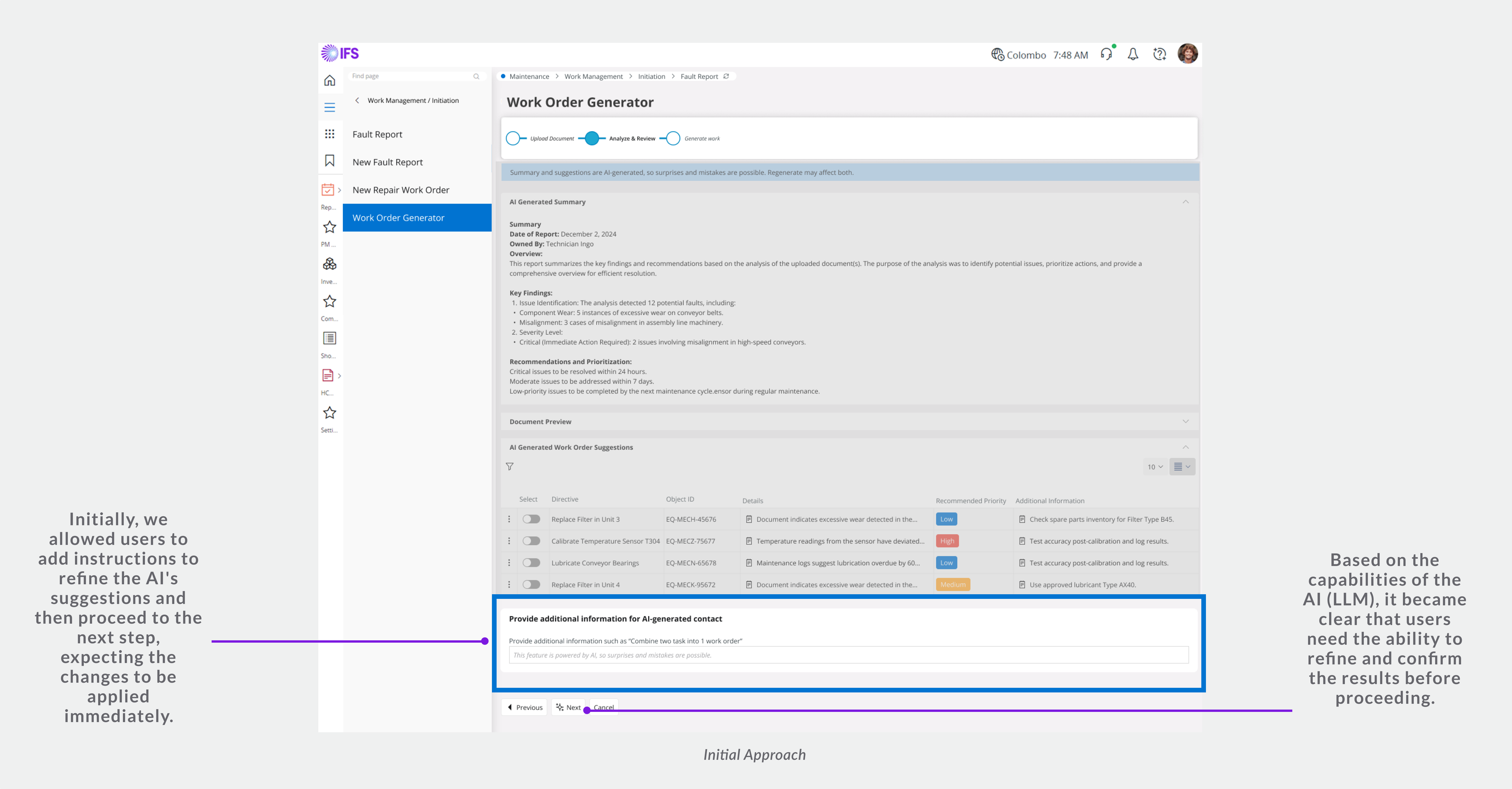
Our project began with a core, but unvalidated, assumption: that one maintenance report would typically result in a single, linear work order. We quickly built initial wireframes based on this linear flow  to define a solution for testing.

Usability Testing & Critical Insight

We used usability testing to immediately challenge our initial assumption. The feedback was critical: engineers needed to handle multiple work orders simultaneously from a single report to manage high-volume, multi-disciplinary tasks efficiently.

Strategic Pivot to Data-Driven Efficiency

This insight triggered a major strategic pivot , shifting the focus from a linear, single-action flow to designing a robust, high-utility Data Table interface capable of bulk processing and multi-work order navigation. This was key to making the system viable for high-volume enterprise use.

ITERATION

Designing for Trust & Control: Executing the Multi-Task Workflow

Our first challenge was trust. We couldn't just have a 'magic box.' By introducing informative markup text and clear visual cues, we explained how the AI generated the work orders, turning a 'black box' into a transparent, trusted assistant.

Iterations

Designing for Expert Efficiency

Our initial assumption of a single action per report was quickly invalidated. Users needed to manage many work orders at once. This led to our major pivot to a high-utility Data Table design, which is central to high-volume efficiency.
We reorganized the content and introduced multi-work order navigation so they could easily jump between groups of tasks. This was the key to making the system viable for high-volume use.
We added inline editing and bulk actions for rapid processing, addressing the need for flexibility and efficiency.

Designing for Feasibility & Integrity

"Design isn't done until it's built. We faced two major technical constraints."

Constraint #1

Designing for AI integrity & process control.

Problem
The AI's suggestions needed to be refined by the reliability engineers, but immediate, unconfirmed edits could cause data inconsistencies in the downstream workflow. We needed a safe, controlled 'edit mode' before committing to the work order.
Option 1: Dialog Box for Refinement
Concept: A dedicated "Regenerate" button opens a modal dialog where users input prompts. They review and confirm before the main screen updates.
Pros: Controlled environment for complex edits. Minimises risk of accidental changes. Clear separation of AI input and final output.
Cons: Introduces a step and slight interruption to the main workflow.
Decision Rationale
This option established a clear edit mode,' ensuring data integrity. It provides a safer, focused user experience aligned with the technical limitations, prioritizing system stability and reliability.
Option 2: Inline Action Bar
Concept: Allow users to type refinement prompts directly on the main screen. The AI processes and refreshes suggestions in place.
Pros: Fluid, real-time editing. No page interruption.
Cons: High risk of confusion and instability if the AI output is slow or inconsistent. Technically not feasible within the IFS framework (vetoed by Engineering).
Decision Rationale
We rejected this option primarily because of technical feasibility within the current framework. UX-wise, it also created a greater risk of uncontrolled changes to critical data.

Constraint #2

Critical data visibility within framework limits.

Problem
Users needed detailed data (expenses, materials) from their generated work orders, but the "table-on-table" view was also technically unfeasible within the framework. We needed to ensure no critical details were missed.
Option 1: Displaying Detailed Info in a Dialog Box
Concept: User clicks a row, and a modal dialog appears, forcing full attention on the detailed information.
Decision Rationale
Chosen. The dialog box provides a clear, focused view of the critical information, minimising distractions. We prioritised data visibility and integrity over in-line convenience.
Option 2: Expanding Grouped Data Below Table
Concept: User clicks a row, and a hidden section expands below the table with the grouped detail data.
Decision Rationale
In long lists, users are likely to miss the expanded details when scrolling. It doesn't guarantee they focus on the critical information, introducing a risk of oversight in complex work orders.

Shaping the Product After Launch

"Design is never done. It's a constant process of iteration, learning, and improving."

ITERATION

System feedback and loading states

Problem
The existing framework lacked clear loading indicators. When the engineer clicked 'Regenerate,' the dialog box closed, and the AI suggestions took time to update. Users were confused—did the system crash, or was the AI still working? This eroded trust in the automated process.
Our Approach
This wasn't just a UX fix; it was a technical collaboration. I worked with the engineering team to ensure the system provided immediate, persistent feedback:
1.  Keep the Dialog Open: The refinement dialog box now remained open while the AI was processing.
2.  Clear Loading State: The 'Regenerate' button displayed a loading spinner and a clear message ("AI Processing...") to confirm the command was received.
3.  Confirmation: The dialog only closed after the results were ready, followed by a confirmation toast message ("Work Orders Updated") on the main screen.

Key takeaways

My strategic design impact:

AI-Driven, Human-Centric Design
I focus on building user trust by designing controlled hand-off workflows and prioritizing AI integrity over simple automation.
Feasible Implementation & Collaboration:
I leverage technical constraints as design inputs to deliver safe, reliable, and feasible products that align with engineering realities.
Mastery of Expert Workflows:
I design high-utility Data Tables and interfaces for bulk actions, ensuring maximum efficiency in complex B2B environments.